## 使い方 右クリック→thakyuu→WorldJointUtilsでウィンドウが表示されます。 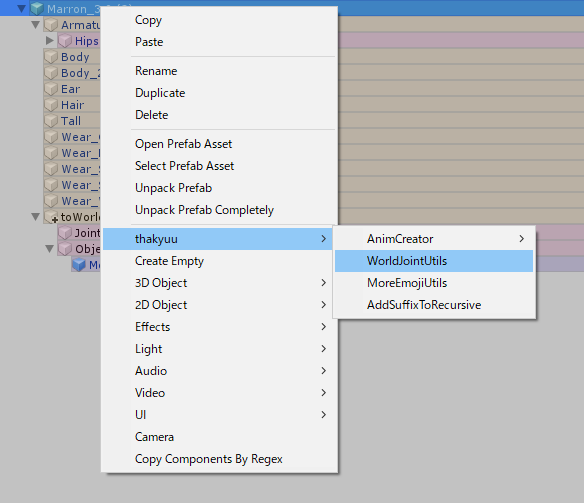 Avatar Descriptorの入ってるオブジェクトと、固定してないときに追従させたいボーンと、固定させるアイテムを指定して実行 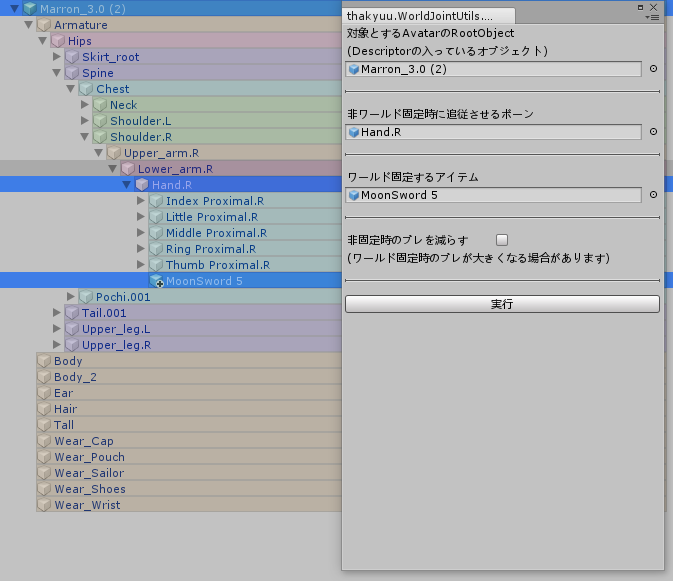 自動でArmatureの外にtoWorldJointと中にJoint_to[接続先ボーン名]_[アイテム名],Object_[アイテム名]が生成されるので、 好きな表示切り替えツール(RadialInventoryとか)でそれぞれを出し入れできる様にすればOK Object_が表示のオンオフで、Joint_は固定/追従の切り替え(Joint_が有効のとき指定した接続先ボーンに追従、無効のときワールド固定) 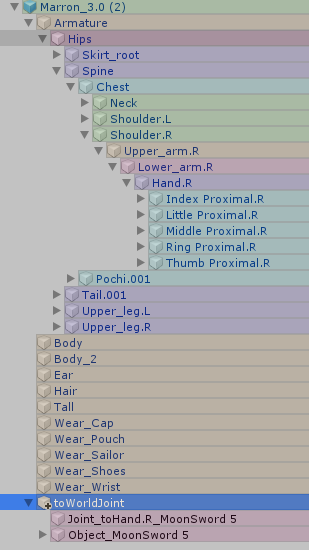 ## 配布 [202009210001_WorldJointUtils.zip](/attachment/60fe309f37f340004cda1a2b) ## ライセンス MIT --- ## Page Navigation - Canonical URL: https://wiki.thakyuu.invr.chat/VRC_Tools/WorldJointUtils - Permalink: https://wiki.thakyuu.invr.chat/60fe2f9337f340004cda1a25 - Parent: [VRC_Tools](/5f8d22b3c04cf70047878730.md) - Children: 0 total - Total descendants: 0 - Siblings: 7 total - [Avatar_Mirage_Utils](/5f8d25c5c04cf70047878733.md) - [CheckerDeselector](/60fc136c37f340004cda11bf.md) - [DuelOverlay](/61ee9be823ca95004c943aff.md) - [UseClothPrefabListup](/60f14c2f37f340004cd9f83a.md) - [VRC_VaNiiMenuSupporter](/618cb50537f340004cdb6b1e.md) - [XSOverlay_Notifier](/60910454c04cf70047878775.md) - [liltoon_extra_emission](/62ee426c23ca95004c972dba.md) - Last updated: 2021-07-26T03:49:31.648Z by thakyuu - Full page listing (all children regardless of count): https://wiki.thakyuu.invr.chat/_api/v3/page-listing/children?id=60fe2f9337f340004cda1a25Constraintでのワールド固定はこんな感じの構造にしておくと、ToRightHandJointをオブジェクト毎Enable/Disable切り替えすればワールド固定と手元追従の切り替えできるので、EmoteSwitchとかからも扱いやすくて楽 pic.twitter.com/i5VUpGi3c9
— どっかの阿求 (@thakyuu) April 7, 2020